October 21st, 2026

We had an arseload of servers running ancient versions of Ubuntu that were running ancient versions of PHP on Apache that were not going to get patched for this week's PHP vulnerability. On most projects this was the path I elected to walk after considering it to be the least abrasive of the choices available. I do not promise it is the smartest choice but it was a very consistent choice.
- Upgrade to Ubuntu 26.04 LTS (many 20.04 LTS, one 25.04 abandoned Jan 2026)
- Upgrade PHP to 8.5.12 (ranging from 8.0, 8.1, and 8.3)
[Tip: `lsb_release -a` will tell you where you are currently Ubuntu-version wise]
Upgrade Ubuntu
1) If used, remove Ondřej's PHP repo from /etc/sources.list.d/*
Reason: removing it now and letting Ubuntu be mad about not finding packages, ergo removing Apache and PHP for you ended up being the preferable choice later on. We WILL be putting it back in later because that repo is king. Without this step, you may find you still have an old version of PHP installed side-by-side and being served instead of the one good version that currently exists. Figuring that out that was the oddity happening to my web service and fixing it was annoying and a waste of time that I did not want to repeat many more times today.
Reason: removing it now and letting Ubuntu be mad about not finding packages, ergo removing Apache and PHP for you ended up being the preferable choice later on. We WILL be putting it back in later because that repo is king. Without this step, you may find you still have an old version of PHP installed side-by-side and being served instead of the one good version that currently exists. Figuring that out that was the oddity happening to my web service and fixing it was annoying and a waste of time that I did not want to repeat many more times today.
2) Are you on DigitalOcean still? If so I am sorry to hear that but we also have yet to migrate everything off. The thing is if your Ubuntu is ultra ancient, their mirrors.digitalocean.com repos will stop you from getting work done.
Edit /etc/sources.list and change all instances of "mirrors.digitalocean.com" to "archive.ubuntu.com" otherwise the Ubuntu upgrade system will later lose its mind about not being able to find anything that matters.
Edit /etc/sources.list and change all instances of "mirrors.digitalocean.com" to "archive.ubuntu.com" otherwise the Ubuntu upgrade system will later lose its mind about not being able to find anything that matters.
3) sudo apt update
4) sudo apt full-upgrade
4) sudo apt full-upgrade
5) sudo do-release-upgrade
6) reboot
Repeat step 5 and 6 over, and over, and over, until you finally reach 26 LTS.
When it asks if you want to keep a config file or overwrite with the package the defaults, its best to choose keep, UNLESS if your Apache was older than 2.4. There are a lot of config changes in 2.4 and you will hate yourself if you manually update it.
If at any point do-release-upgrade refuses to do its job because of "pending updates", figure out what they are with `apt list upgradable` and if it is something like MariaDB being a pain because some weird package that starts with a G not existing, you may need to enable the "universe" repository. I had this happen on one server while stepping through Jammy.
5b) sudo add-apt-repository universe
6) reboot
Repeat step 5 and 6 over, and over, and over, until you finally reach 26 LTS.
When it asks if you want to keep a config file or overwrite with the package the defaults, its best to choose keep, UNLESS if your Apache was older than 2.4. There are a lot of config changes in 2.4 and you will hate yourself if you manually update it.
If at any point do-release-upgrade refuses to do its job because of "pending updates", figure out what they are with `apt list upgradable` and if it is something like MariaDB being a pain because some weird package that starts with a G not existing, you may need to enable the "universe" repository. I had this happen on one server while stepping through Jammy.
5b) sudo add-apt-repository universe
Upgrade/Reinstall PHP and Apache
1) Push Ondřej's PHP repo back in. Steve Grunwell found and shared this script that Ondřej did for us to quickly get this done which you can find here: https://packages.sury.org/php/README.txt but also here below for posterity sake as the version I was using on this date.
2) apt update
3) apt install ...
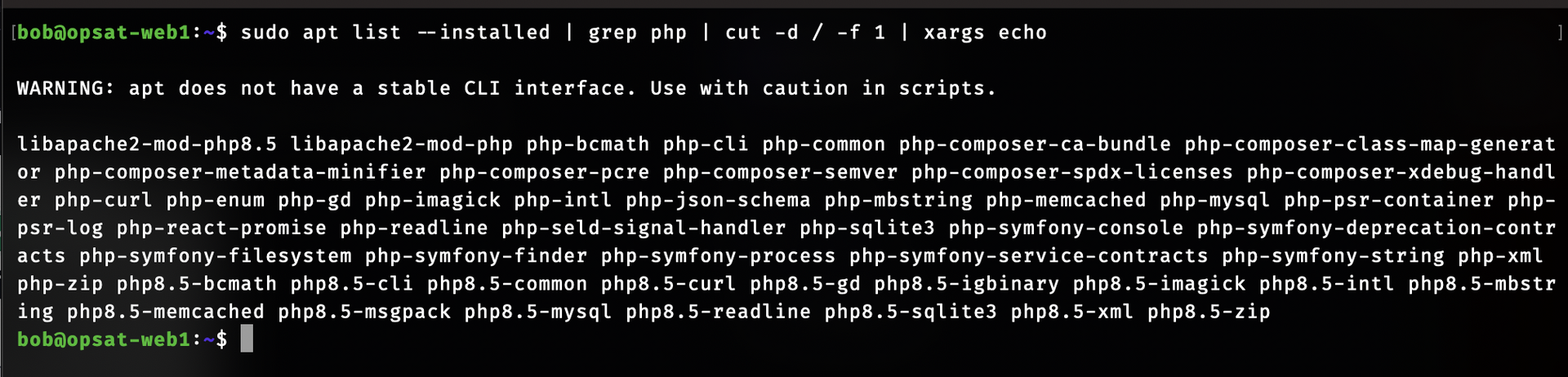
If you have a server already using the sury repo, you can do something like this to find your package set and copy paste it in:
$ sudo apt list --installed | grep php | cut -d / -f 1 | xargs echo
If you do not, here is a dump of mine that was pretty feature complete.
REMEMBER I AM USING APACHE, READ THIS CRAP BEFORE YOU PASTE IT TO APT INSTALL.
libapache2-mod-php8.5 libapache2-mod-php php-bcmath php-cli php-common php-composer-ca-bundle php-composer-class-map-generator php-composer-metadata-minifier php-composer-pcre php-composer-semver php-composer-spdx-licenses php-composer-xdebug-handler php-curl php-enum php-gd php-imagick php-intl php-json-schema php-mbstring php-memcached php-mysql php-psr-container php-psr-log php-react-promise php-readline php-seld-signal-handler php-sqlite3 php-symfony-console php-symfony-deprecation-contracts php-symfony-filesystem php-symfony-finder php-symfony-process php-symfony-service-contracts php-symfony-string php-xml php-zip php8.5-bcmath php8.5-cli php8.5-common php8.5-curl php8.5-gd php8.5-igbinary php8.5-imagick php8.5-intl php8.5-mbstring php8.5-memcached php8.5-msgpack php8.5-mysql php8.5-readline php8.5-sqlite3 php8.5-xml php8.5-zip
If you have a server already using the sury repo, you can do something like this to find your package set and copy paste it in:
$ sudo apt list --installed | grep php | cut -d / -f 1 | xargs echo
If you do not, here is a dump of mine that was pretty feature complete.
REMEMBER I AM USING APACHE, READ THIS CRAP BEFORE YOU PASTE IT TO APT INSTALL.
libapache2-mod-php8.5 libapache2-mod-php php-bcmath php-cli php-common php-composer-ca-bundle php-composer-class-map-generator php-composer-metadata-minifier php-composer-pcre php-composer-semver php-composer-spdx-licenses php-composer-xdebug-handler php-curl php-enum php-gd php-imagick php-intl php-json-schema php-mbstring php-memcached php-mysql php-psr-container php-psr-log php-react-promise php-readline php-seld-signal-handler php-sqlite3 php-symfony-console php-symfony-deprecation-contracts php-symfony-filesystem php-symfony-finder php-symfony-process php-symfony-service-contracts php-symfony-string php-xml php-zip php8.5-bcmath php8.5-cli php8.5-common php8.5-curl php8.5-gd php8.5-igbinary php8.5-imagick php8.5-intl php8.5-mbstring php8.5-memcached php8.5-msgpack php8.5-mysql php8.5-readline php8.5-sqlite3 php8.5-xml php8.5-zip
Reconfigure Apache
1) If during do-release-upgrade you told it to install the vanilla Apache config you will probably need to re-symlink any modules you were using (ssl, rewrite, socache shm, macro, etc) from /etc/apache2/mods-available into /etc/apache2/mods-enabled. PHP 8.5 should have automatically been linked in for you.
2) Again if you blasted the vanilla config you will need to relink your site config into /etc/apache2/sites-available
3) Again if you blasted the vanilla Apache config you will need to edit /etc/apache2/apache2.conf
Find the <Directory /> section. Now ONLY WITHIN THAT SECTION:
Change "Require all denied" to "Require all granted". This actually enables the web server to serve, it defaults to nope now for some reason.
If you need .htaccess support change "AllowOverride None" to "AllowOverride All" otherwise project local .htaccess files will not be read.
Find the <Directory /> section. Now ONLY WITHIN THAT SECTION:
Change "Require all denied" to "Require all granted". This actually enables the web server to serve, it defaults to nope now for some reason.
If you need .htaccess support change "AllowOverride None" to "AllowOverride All" otherwise project local .htaccess files will not be read.
4) sudo apachectl restart
Theoretically you now have a working web service again. At this point it is down to you to figure out the snowflake needs of your project, like if you were using an Apache module I didn't mention or a PHP module I wasn't meaning go back to step 1 of this section until Apache starts without crying.
Fin?
At best you are done. At worst you now have to update your project to deal with having jumped to the most modern PHP with your old project. I got lucky, mine seem to only cry about deprecated features, which I have muted to deal with next week because the rest of this week is dedicated to waiting to see if anyone has problems.
